Understanding DNS behavior with Bind9 and dnsmasq
• 2 minute read
dns, proxy
Warning: This is a note, so don't expect much 😅!
Microsoft has a document called Cloud Adoption Framework that provides best practices for adopting the cloud. One section discusses DNS integration at scale. So far, so good, though how do we understand many of the concepts presented there? For example, when I read it, I lacked a deeper understanding of DNS 🙄. Here at the blog, we often create simplified environments to help illustrate concepts. So, the same applies to DNS. Let's see the project's lab structure:
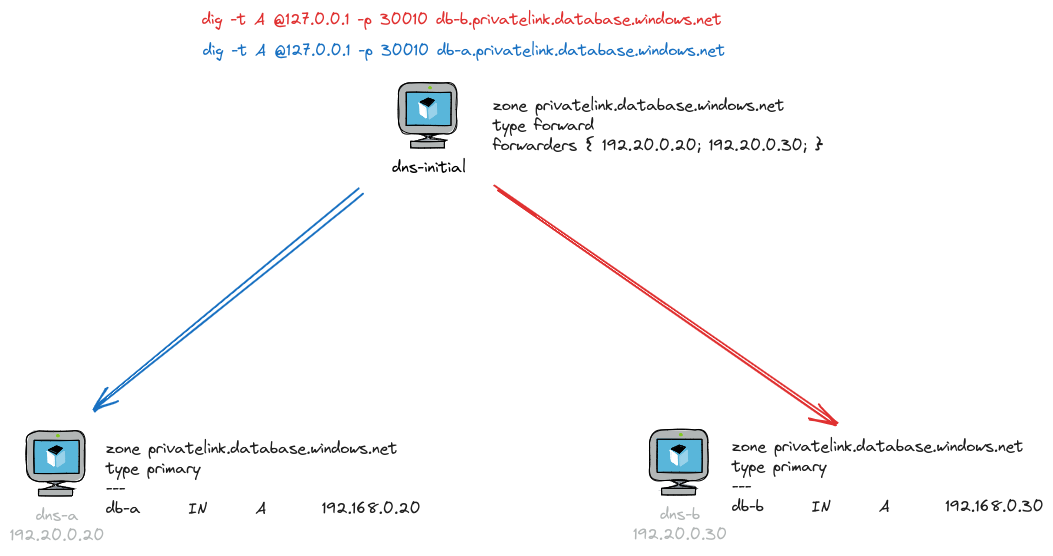
Explanation:
- DNS Server
dns-initialis the DNS Proxy. dns-initialforwards queries todns-aanddns-bif the zone isprivatelink.database.windows.net.- Only
dns-ais able to solve a query fordb-a.privatelink.database.windows.net. - Only
dns-bis able to solve a query fordb-b.privatelink.database.windows.net.
To start servers A and B, run the following command:
docker compose up -d dns-a dns-bYou can either run the DNS Proxy with Bind9 or dnsmasq. To run the DNS Proxy with dnsmasq, execute the following command:
docker compose up dns-initial-dnsmasqIn another terminal, you can query the dns-initial-dnsmasq with the following commands:
dig -t A @127.0.0.1 -p 30005 willianantunes.com
dig -t A @127.0.0.1 -p 30005 db-a.privatelink.database.windows.net
dig -t A @127.0.0.1 -p 30005 db-b.privatelink.database.windows.net
Sometimes, the query will return NXDOMAIN either for db-a or db-b. This happens because the DNS Proxy returns the first answer it receives. If you query db-a.privatelink.database.windows.net and receive NXDOMAIN, it means server B answered first to the DNS Proxy. You can change the cache-size in the dnsmasq.dns.conf file. This will make the answer to the query consistent because the DNS Proxy will cache it.
How about running the DNS Proxy with Bind9? Execute the following command:
docker compose up dns-initialIn another terminal, you can query the dns-initial with the following commands (notice the port is different):
dig -t A @127.0.0.1 -p 30010 willianantunes.com
dig -t A @127.0.0.1 -p 30010 db-a.privatelink.database.windows.net
dig -t A @127.0.0.1 -p 30010 db-b.privatelink.database.windows.net
Check out the whole project on GitHub to see how the lab was set up.
I hope this may help you. See you 😄!